Connect QuickBooks Online
Authorise your organisation’s QuickBooks Online company through Intuit. The app shows the connected company name and date. You can disconnect at any time from NexInvo or from your Intuit account.
For QuickBooks Online
NexInvo reads invoices from your connected QuickBooks Online company and renders a printable TAX INVOICE in the layout prescribed by the Inland Revenue Department.
The problem
Many Sri Lankan businesses run sales in QuickBooks Online but still need the tax-invoice layout specified by the Inland Revenue Department.
QuickBooks Online does not issue that IRD tax-invoice document. NexInvo prints your existing QBO invoices in the prescribed format — without retyping.
Gazette Extraordinary No. 2481/22
From 1 July 2026, VAT-registered persons must issue tax invoices in the format specified by the Commissioner General of Inland Revenue — Gazette Extraordinary No. 2481/22 of 27 March 2026, under section 20 of the Value Added Tax Act, No. 14 of 2002. NexInvo is built around that prescribed layout, not a generic invoice template.
See the IRD gazette notices.
How it works
Authorise your organisation’s QuickBooks Online company through Intuit. The app shows the connected company name and date. You can disconnect at any time from NexInvo or from your Intuit account.
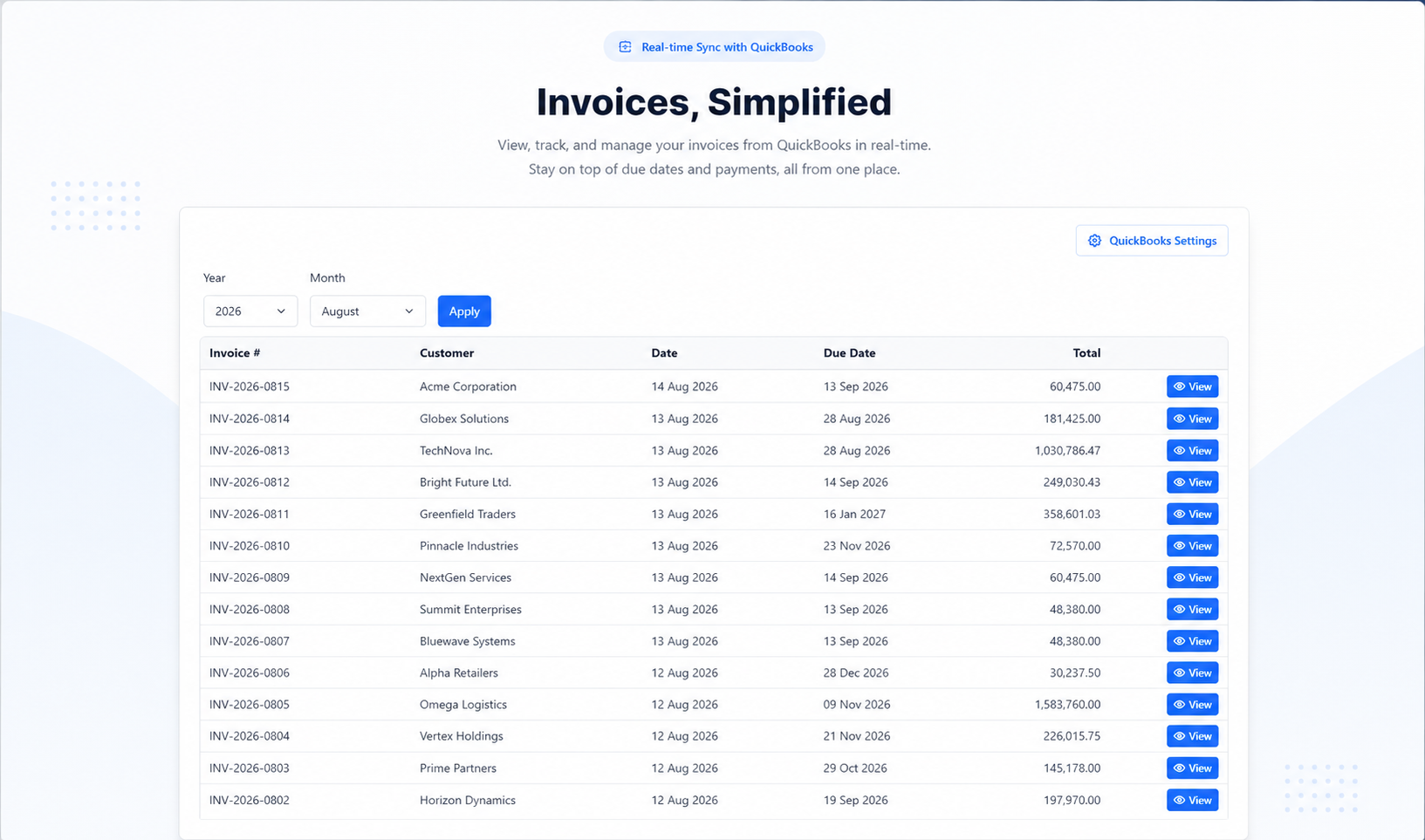
List invoices from the connected company. Filter by year and month. Columns include invoice number, customer, date, due date, and total — with empty and not-connected states handled.
Open an invoice to see the TAX INVOICE layout, then use the Print button. Custom A4 pagination keeps multi-page invoices clean in the browser print dialog.
What NexInvo does
Each organisation gets its own workspace and QuickBooks Online connection, so one team’s invoices stay with that team.
Connect your QuickBooks Online company, see the connected name and date, and disconnect whenever you choose.
Filter by year and month. Review invoice number, customer, date, due date, and total — then open the one you need to print.
Print from the browser with clean A4 page breaks, or save a PDF straight from the print dialog.
Your QuickBooks invoice becomes an IRD-prescribed TAX INVOICE: TIN and party details, date of supply, line amounts excluding VAT (Rs.), VAT at rate, total including VAT, amount in words, and mode of payment. Add your organisation banner and authorised signatory if you use them.
Who it’s for
Businesses that record sales in QuickBooks Online and need the IRD tax-invoice format for customers.
People who prepare customer documents and should not retype invoice data into a separate template.
Organisations that need a separate workspace and QuickBooks connection for each company they operate.
Trust
NexInvo is developed and published by NEXTEK GLOBAL (PVT) LTD.
QuickBooks access only after explicit consent, and read-only — NexInvo never writes to your books. Disconnect anytime from the app or from Intuit.
Each organisation’s invoices and QuickBooks connection stay in its own workspace.
Privacy Policy and Terms of Service from NEXTEK GLOBAL (PVT) LTD.
Request access
Message NEXTEK GLOBAL on WhatsApp.
Request access on WhatsApp Or email sales@nextek.lk